


Tackle Football Playmaker X
4.5113.00 Reviews
App Specs
- Version
- 1.9.0
- Updated On
- License
- Free
- Downloads
- 100,000+
- Developer
- True Partners, LLC
- Categories
- Sports
- Platform
- Android
Screenshots
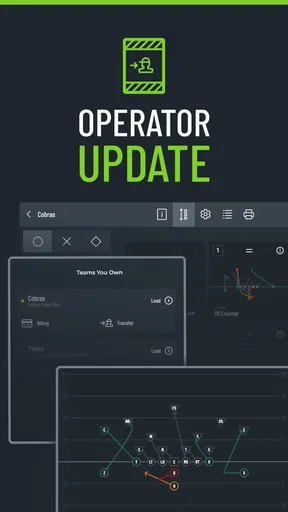
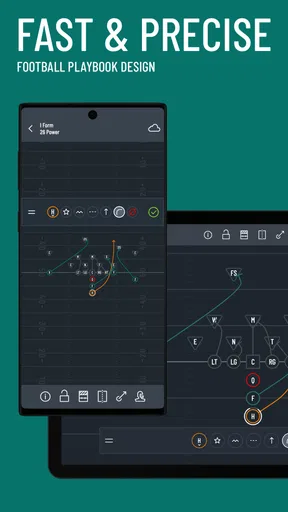
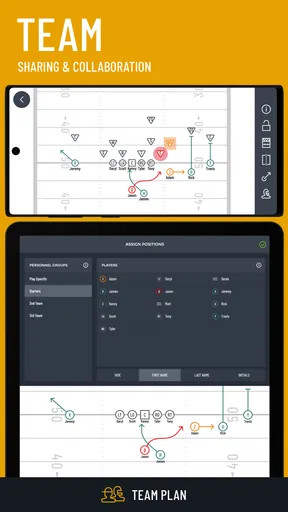
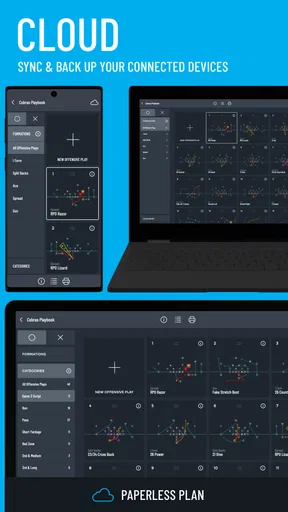
 Analysis by AppCompare
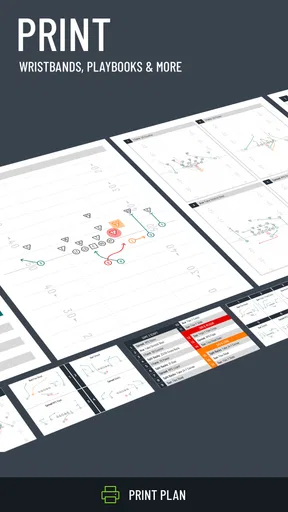
Designing a football playbook sounds simple until the ideas have to work for an entire team. A coach may think in formations, an assistant may need clean printing, and players may need a wristband reference that can be understood quickly under pressure. Tackle Football Playmaker X is built around that practical problem: it is a sports app for creating tackle-football playbooks, preparing printed playbooks, and producing wristband material.
I approached it less like a casual sports utility and more like a preparation tool. The useful question is not whether it replaces every coaching method, but whether it helps turn a coach’s ideas into something the rest of the team can read, carry, and use. In that role, the app has a clear purpose. It is free to install, intended for Everyone, and developed by True Partners, LLC. Its average rating is 4.5 from around 334 ratings, with over 100K installs, so it has attracted a meaningful audience without feeling like an obscure experiment.
My overall impression is positive, especially for coaches who want a focused football workspace rather than a general notes app. The experience also has limits. A playbook is only as useful as its naming system, visual clarity, and printing routine, and no app can make a confusing scheme understandable by itself. The strongest results come when I treat the app as part of a disciplined workflow: design carefully, review the result from a player’s point of view, then prepare a smaller and clearer set of information for game situations.
How clearly the playbook supports reading and navigation
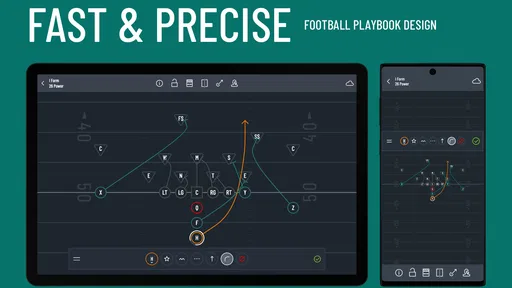
The most important accessibility question here is readability. Football diagrams already contain a lot of visual information: player positions, movement, assignments, routes, blocking ideas, and sometimes defensive reactions. When all of that is placed on one screen or page, a technically complete play can still be difficult to understand. I found that the app’s value depends heavily on how deliberately I organize those details rather than simply adding more of them.
I would begin with a small vocabulary for play names and keep it consistent. If one play is identified by formation, direction, and concept, I would use that order everywhere. That makes the playbook easier to scan and reduces the mental effort required from assistants and players. A coach who changes naming style from page to page creates a navigation problem that the app cannot solve. The tool is most effective when it supports a repeatable structure.
For readability, I would also separate teaching information from emergency information. A full playbook can explain the complete idea, while a wristband reference should be limited to what a player must recognize immediately. Trying to place every coaching note into the wristband version would make it less useful. This is one of the most important practical trade-offs: completeness helps during preparation, but restraint helps during a game.
The app’s focus on printing makes this distinction especially relevant. A digital design may look acceptable while being less comfortable on paper, particularly when labels are crowded or when several symbols compete for attention. I would always inspect a printed sample before preparing a complete set. That simple step can reveal whether the text is too small, whether the line work is easy to follow, and whether the page still makes sense when held at arm’s length.
Worth Reading Before You Choose

Flipboard Shows What News Apps Must Do Beyond the Feed

Switching to Android Auto Means Rethinking Your Driving Routine

Google Calendar Makes a Crowded Week Easier to Manage

Ludo King Makes the Most of the Minutes Between Plans

Baby Panda World Brings Quick Play to Modern Phones, but Its Game Library Feels Busy

ESPN’s Live Game View Makes Following Close Games Easier
Navigation also matters for people who do not spend every day inside the playbook. An assistant covering a position, a substitute player, or a family member helping with organization should not need to understand the entire offensive system just to locate one item. Clear grouping by formation, situation, or package can make the material more approachable. I would avoid relying only on color or tiny visual differences to distinguish plays, because printed copies, lighting conditions, and individual vision can vary.
There is a useful workflow hidden in that approach. First, build the detailed version for teaching. Next, remove anything that does not affect recognition or execution. Finally, test the shortened version with someone who was not involved in creating it. If that person cannot find the right play quickly, the problem is probably the organization rather than the user. This kind of outside check is more valuable than endlessly polishing a diagram in isolation.
Why the printing workflow matters more than it first appears
Many football tools stop at drawing. This app is more interesting for teams that need physical material after the design stage. Printing changes the way I judge the product because the final result has to survive ordinary use: pages may be folded, carried in a bag, viewed outdoors, or handled by someone who is moving quickly. A design that looks attractive on a phone is not automatically a good sideline reference.
I would prepare separate outputs for different audiences. Coaches may need the complete explanation, including coaching points and adjustments. Players often need a faster visual cue. Assistants may need a position-specific subset. Creating these layers takes more planning, but it prevents a common mistake: giving everyone the same dense document and expecting them to extract the right information under pressure.
This is also where the app compares favorably with a general document editor. A word processor or presentation tool can produce pages, but it usually leaves the football-specific organization entirely to the user. A generic drawing app may offer flexibility, yet it can become awkward when the same concepts must be repeated across many plays. Tackle Football Playmaker X is better suited to someone who wants the playbook itself to be the central object rather than a collection of unrelated pages.
Motor, sensory, and situational considerations
For users with different physical abilities, the key issue is the amount of precise interaction required during creation. Drawing or arranging football information can involve repeated taps, selections, and adjustments. That may be comfortable for one coach and tiring for another, especially during a long planning session. I would therefore work in short batches, save or review each group of plays, and avoid trying to build an entire season’s material in one sitting.
A stylus or larger-screen device may feel more manageable for some people than a small phone, but the right choice depends on the device and the user. I would not assume that every coach can comfortably perform fine visual work on a compact display. Someone with limited dexterity may prefer to prepare fewer, more reusable formations instead of constantly creating small variations. That is not merely a compromise; it can improve consistency across the team.
There is a similar consideration for sensory load. A playbook filled with overlapping arrows, labels, and decorative distinctions can be harder to process than a plain diagram with a strong hierarchy. I would use visual differences only when they communicate something meaningful. If color is used, I would pair it with position, text, line style, or grouping so the play remains understandable when color is difficult to distinguish or when the page is printed in a different way.
Players also vary in how they learn. Some understand a diagram immediately, while others need a spoken explanation, a walk-through, or a simplified sequence. The app can support the visual part of that process, but it should not become the only teaching method. I would use the detailed playbook during instruction, then confirm understanding through demonstration. That approach is especially helpful for younger players or anyone who finds symbolic diagrams demanding.
One practical tip is to create a “minimum recognition” version of every important play. It should answer only a few questions: where do I line up, what is my first movement, and what is my primary responsibility? The full diagram can remain available for study. This two-level method reduces pressure on players who struggle with dense visuals while preserving the detail coaches need.
Another useful adjustment is to avoid making text carry information that the diagram already communicates. Repeating the same instruction in several places can make a page feel safer to the creator but slower to read. I would reserve written notes for exceptions, alerts, or reminders that cannot be shown clearly through positioning and movement. That keeps the page calmer and helps the most important information stand out.
Using the app when time, attention, and conditions are limited
Situational access is just as important as the design process. A player may look at a wristband while standing, moving, or listening to a coach. A coach may need to find a play while managing substitutions and communication. In those moments, the best reference is not the one with the most information; it is the one that can be understood with minimal attention.
I would organize wristband material around the way calls are actually made. If the team uses a number, color, word, or combination, the printed reference should make that relationship obvious without forcing the player to search through unrelated entries. The exact calling system belongs to the team, but the principle is universal: the reference should match the language players hear on the field.
Lighting and movement are easy to overlook. Small text may work at a desk and fail outside. Thin lines may disappear when a page is folded or viewed quickly. I would favor strong spacing and uncluttered diagrams, then test the result in the environment where it will be used. This is a better accessibility check than judging the design only on a bright, stationary screen.
The app can also fit different team contexts, but not all contexts equally well. A school or club program with a stable coaching staff may benefit from a shared, carefully maintained playbook. A volunteer coach working with limited time may appreciate the focused purpose, yet may find the setup demanding if the team has not agreed on terminology. A large program with several age groups might need strict version control and a process for ensuring that the printed material matches the current scheme.
For a realistic example, imagine a coach preparing for a weekend game after practice. The coach has a detailed set of plays, but the players only need a short selection for the upcoming opponent. I would use the app to keep the full diagrams for review, select the calls that matter for that game, and print a simpler wristband reference. Before distributing it, I would ask one player from each position to locate a call and explain the first assignment. If they hesitate, I would revise the layout rather than assume they simply need to memorize more.
This workflow also helps answer whether the app is suitable for remote or shared preparation. It can be useful when one person handles design and another handles printing, but the team still needs a clear naming convention and a method for identifying the current version. Without that discipline, printed copies can drift apart. The app helps create material; it does not replace communication about which material is authoritative.
Where friction and barriers remain
The first barrier is the learning curve created by football itself. Someone unfamiliar with formations and assignments may not find the app immediately approachable, even if the interface is straightforward. This is not a criticism of the product’s purpose, but it does affect who should use it. It is aimed at people who already understand what they want to diagram or who are willing to learn the terminology alongside the tool.
The second barrier is the quality-control burden. Because the output may be printed and used by multiple people, small design mistakes matter. A misplaced label, an ambiguous arrow, or a confusing abbreviation can turn into a coaching problem. I would proofread every important play with another person and compare the printed result with the intended design. That extra step is essential for a tool whose output influences real-world instruction.
There is also a cost consideration beyond the free installation. The app includes in-app purchases ranging from about $10.99 to $15.99 per item. That does not automatically make it poor value, but it means I would first establish whether the free experience covers the team’s workflow and then decide whether a paid item solves a specific need. Coaches should avoid purchasing simply because they have already invested time in building a playbook.
The current version is 1.9.0, and the app has been available since Apr 20, 2020. Those details suggest a product with some history rather than a brand-new release, but they do not remove the need to check how well it fits a current device and a current coaching routine. I would install it on the device that will actually be used for preparation, test a small playbook, and only then commit to a larger project.
Another limitation is that a specialized playbook app may be less flexible than a blank canvas. If a coach wants to combine football diagrams with extensive video analysis, long scouting reports, collaborative comments, or broad team administration, a general coaching platform may be a better central workspace. Tackle Football Playmaker X makes more sense when play design, printed playbooks, and wristband preparation are the main priorities.
It may also be the wrong choice for a player who only wants to study plays. A player does not necessarily need to create diagrams or manage print layouts. In that case, a coach-prepared document, a team communication system, or an in-person teaching session may be simpler. The app earns its place when someone is responsible for turning a football system into organized reference material.
Finally, accessibility cannot be judged by a single label. The Everyone content rating describes the intended age suitability, not whether every person will find the design process comfortable. I would evaluate screen size, text density, contrast, input effort, and the team’s teaching method in combination. That honest assessment is more useful than assuming that a sports app will work equally well for every coach and player.
An inclusive verdict for coaches and teams
After using it as a planning and preparation tool, I see Tackle Football Playmaker X as a focused option for coaches who want to move from football ideas to usable diagrams and printed references. Its strongest quality is the connection between playbook creation and the material a team can actually carry. That makes it more practical than a generic drawing or note-taking app for this particular job.
I would recommend it to a coach who already has a basic system, wants a central place to organize tackle-football plays, and is willing to review the printed result carefully. It is also a good fit for someone who values wristband preparation and wants to create different levels of detail for coaches and players. The app becomes especially useful when the user treats readability as part of coaching rather than as a final cosmetic step.
I would be more cautious about recommending it to a complete beginner, a team that needs extensive collaboration and administration, or anyone who expects the app to automatically make a complicated scheme easy for every player. Those users may be better served by a broader platform or by a simpler document workflow. Likewise, coaches with motor or visual needs should test the creation process on their preferred device before building a large library.
My best advice is to start with a small pilot: create a few representative plays, make a detailed teaching version and a compact game version, then ask several people to use the printed material without coaching from the designer. That test exposes the real strengths and weaknesses quickly. If the team can find calls, recognize assignments, and understand the layout under ordinary conditions, the app is doing its job.
For a free sports app with a clear football-specific purpose, it offers a sensible bridge between strategy and communication. The paid items deserve a deliberate decision, and the design still requires human judgment, proofreading, and inclusive teaching. Even so, I think it is worth considering for coaches who need more structure than a blank page provides. The inclusive takeaway is simple: use the app to reduce unnecessary complexity, then validate every play with the people who must read and execute it.
Pros
- Supports detailed offensive and defensive play design.
- Useful for coaches preparing game plans and practice sessions.
- Helps visualize player routes before explaining them on the field.
- Play diagrams can be organized for quick sideline reference.
- Designed specifically for American football strategy and terminology.
Cons
- May feel overwhelming for beginners unfamiliar with football formations.
- Creating complex plays can take time on a small phone screen.
- Some advanced tools may require a paid upgrade or subscription.
- Playbook sharing may depend on compatible export or account features.
- Older devices may experience slower performance with large playbooks.
FAQs for Tackle Football Playmaker X
What is Tackle Football Playmaker X?
Tackle Football Playmaker X is a football strategy and play-design app intended to help coaches, players, and enthusiasts create, organize, and review offensive and defensive plays. It is designed around visual playbooks, allowing users to map player routes, assignments, formations, and adjustments in a more practical way than writing everything on paper. Its usefulness depends on the level of detail and tools available in the current version.
Who can benefit most from Tackle Football Playmaker X?
The app is most useful for youth, high-school, amateur, and recreational football coaches who need a convenient way to prepare plays and explain them to their teams. Players can also use it to study assignments and understand formations away from practice. Beginners may appreciate the visual approach, while experienced coaches should check whether the available terminology, formations, and customization options match their specific offensive or defensive system.
Does Tackle Football Playmaker X require an internet connection?
Some functions may work without a constant internet connection, particularly when viewing previously created plays or playbooks stored on the device. However, internet access may still be necessary for downloading the app, receiving updates, synchronizing information, restoring purchases, or using any online sharing features. Before relying on it during practice or on game day, it is wise to open your playbook offline and confirm that the tools you need remain available.
Can I create and share custom football plays in the app?
The main appeal of Tackle Football Playmaker X is the ability to build football plays visually rather than relying only on prewritten diagrams. Depending on the version and platform, users may be able to select formations, position players, draw routes, add assignments, save multiple variations, and organize plays into a playbook. Sharing capabilities can differ, so review the export, image, printing, or team-sharing options before choosing it for collaborative coaching.
Is Tackle Football Playmaker X free to download and use?
The app’s download price and available features may vary between Android and iOS, as well as between different releases. Some versions can be free with optional purchases, advertising, or locked advanced tools, while other features may require a paid upgrade. Check the official store listing carefully before installing, especially for subscription terms, in-app purchases, supported devices, privacy information, and whether your preferred play-design features are included without additional payment.


